Humanoid by Baby Audio

- Free trial
- No iLok
- Offline support
- No player
- Resizable UI
- Perpetual license
Declared by the developer. Not verified by BetterPlugins.
Humanoid by Baby Audio
Humanoid
Vocal Transformer and Hard Tuning Tool
Transform any voice
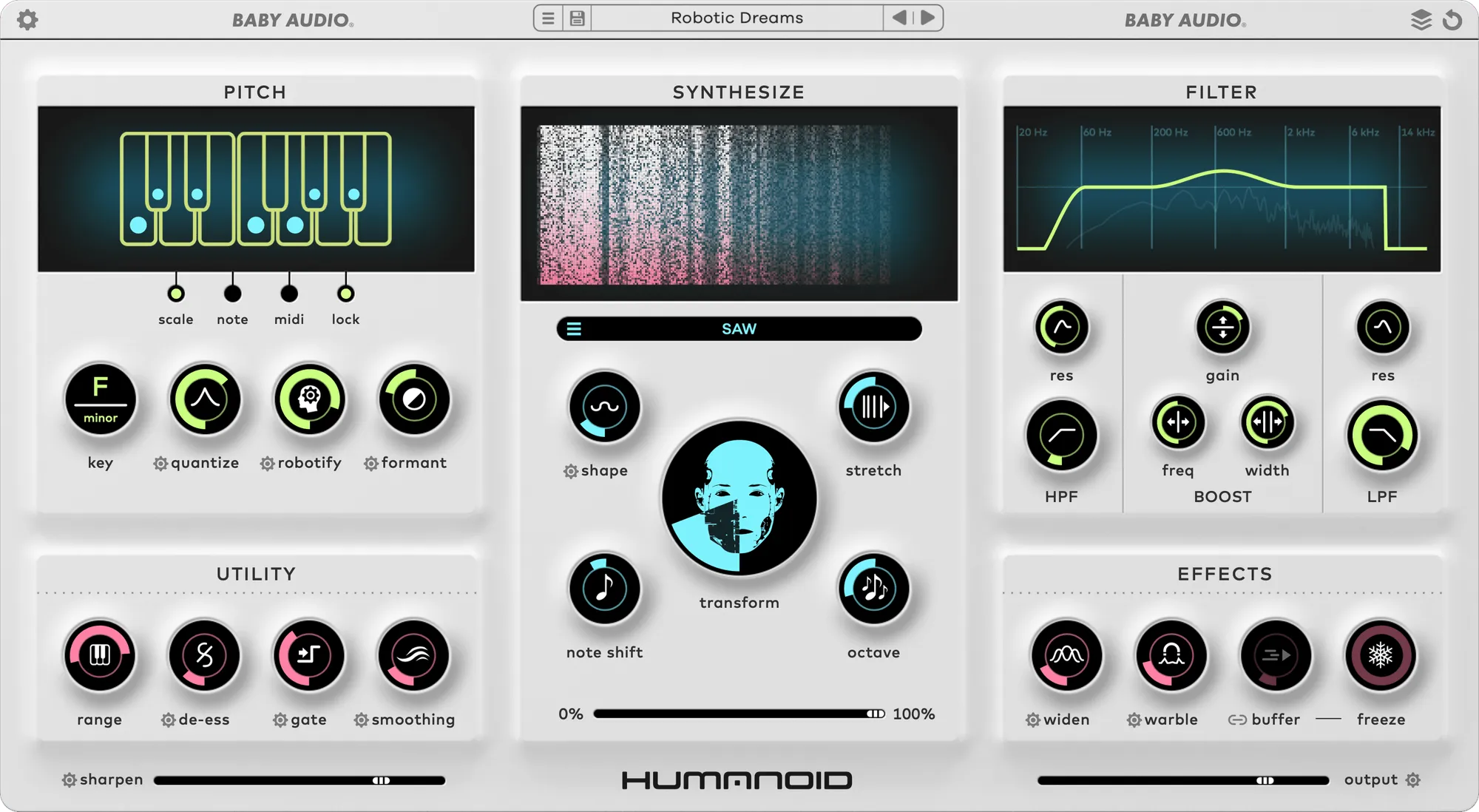
Humanoid is designed to reshape vocal recordings into synthetic and futuristic performances. It is powered by a custom engine built on resynthesis and phase vocoding that allows a voice to be pushed far beyond traditional processing. The plugin works with any style of singing and can shift from gentle enhancement to full robotic character.
You can guide the vocal pitch automatically or control it through MIDI notes. This makes it possible to turn a regular vocal take into new melodies, harmonies or even chord movements. A single voice can be expanded into a layered arrangement that sounds tight and polished.
Find new vocal identities
Humanoid offers tools for modern vocal sound design. The retuning engine is FFT based and delivers smooth pitch control. Formant shifting, spectral freeze and advanced resynthesis features add extra character and introduce a synthetic edge. A low latency option helps when working in realtime or during recording.
From voice to instrument
The plugin includes a wavetable engine that follows the incoming pitch. This allows any vocal to be reshaped into a synth tone. You can blend the original voice with synthetic layers or switch fully to a waveform of your choice. A collection of factory wavetables is included and you can import your own to expand its range.
Sculpt your own sound
Humanoid provides detailed control over the transformation process. Hidden calibration pages are available through the gear icons next to several controls. These menus reveal fine tuning options for users who want deeper shaping.
If you prefer ready made results you can explore a large preset library that covers robotic tones, electronic harmonies and experimental variations.
Main features
Settings
- Show or hide tooltips
- Switch the interface color
- Open the quick guide and other resources
Pitch
- Choose how the tuning engine adjusts incoming audio
- Work in a musical scale, trigger specific notes manually or control pitch through MIDI
- Lock pitch settings while browsing presets
Synthesize
- Use the internal wavetable synth to rebuild the vocal with new shapes
- Add synthetic layers that follow the voice
Filter
- Shape the tone with high and low pass filters
- Use a mid band to cut or boost frequencies
- Perform surgical filtering thanks to spectral processing
Buffer and reset
- Select low, medium or high analysis windows that affect latency and pitch accuracy
- Reset the plugin to its default state at any time
Utility
- Limit the note range for improved detection
- Apply a de essser to soften sibilance
- Use a gate to reduce bleed
- Smooth harsh harmonics for a relaxed tuning character
Transform
- Blend between robotic tuning and full resynthesis
- Adjust shape and stretch to manipulate the wavetable movement
- Shift notes and octaves for thicker or higher pitched results
Effects
- Widen vocals for a larger stereo image
- Add spectral vibrato with the Warble control
- Create rhythmic stutters and freezes that can follow the project tempo
Sharpen
- Enhance clarity with a dedicated enhancement tool
- Fine tune brightness through calibration
Output
- Set global output level
- Adjust input gain and dry wet balance
- Resize the interface by dragging the lower corner
Compatibility
- Available as VST, VST3, AU and AAX in 64 bit format
- Runs on macOS and Windows systems that meet modern standards
- Works in all major digital audio workstations
Helpful resources
- User manual
- Sound examples
- Calibration guide
- Video walkthroughs
- Frequently asked questions
Creative uses
- Generate harmonies and textures from a single voice
- Create synthetic vocal leads for electronic styles
- Design vocal inspired instruments using imported wavetables
- Experiment with freeze and stutter effects for rhythmic ideas